







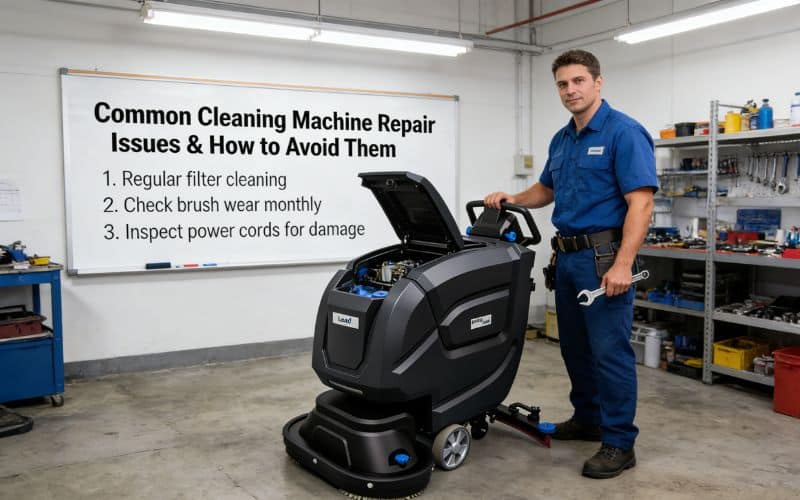
Cleaning machines are complex pieces of equipment that rely on hundreds of individual components to operate smoothly. Whether you are running a walk-behind scrubber or a large ride-on sweeper, even small issues, like buildup on a connection piece or a loose seal, can lead to hours of costly downtime or create a hazardous work environment. Keeping your facility clean is essential for safety and professional appearance, so when your primary cleaning tool goes down, it affects the entire operation.
Fortunately, you can prevent many cleaning machine issues with a little routine maintenance, and basic troubleshooting can help you identify and repair them as needed. By understanding the mechanical and electrical systems of your equipment, you can often catch problems before they become critical failures. Here are the most common cleaning machine repair issues you might experience, along with practical steps to resolve them quickly.
1. The Cleaning Machine Is Not Starting
A cleaning machine that won’t start can make all the difference between finishing a shift on time and experiencing significant downtime. Identifying the cause takes a little troubleshooting. First, check the power supply. For battery-operated machines, ensure the battery is fully charged and securely connected. Corroded terminals or loose cables can prevent power from flowing even if the battery is charged. If the machine is corded, inspect the power cord for any cuts or fraying and ensure the outlet is functional.
Next, inspect the safety features. Many modern cleaning machines have built-in safety interlocks that prevent operation if certain conditions aren’t met. For example, seat switches on ride-on models must detect an operator, and the emergency stop button must be disengaged. Check that the key switch is functioning correctly and that the machine isn’t in a “neutral” or “freewheel” mode that might inhibit starting.
If these basics are covered, look at the battery water levels (for lead-acid batteries). Low electrolyte levels can prevent the battery from delivering the necessary amperage to start the motor. Also, verify that the recovery tank isn’t full; some machines have float switches that shut down the vacuum or the entire machine to prevent overflow. Regularly inspecting these simple elements can save you a service call.
2. The Engine Is Stuttering or Stalling
If your cleaning machine starts but keeps stuttering or stalling during operation—and you’ve already checked the basics—the most common issues on battery-powered equipment center around the electrical system. Low battery voltage is one of the primary culprits. Batteries nearing the end of their service life, or those with one or more defective cells, may deliver inconsistent power, causing the machine to jerk, stall, or shut down under load. If your batteries discharge rapidly or the voltage drops significantly during operation, it’s time to test and possibly replace them.
Faulty controllers are another frequent cause. The controller regulates speed and power delivery; issues like damaged wiring or degraded circuitry can result in intermittent power loss or erratic performance. Regularly inspect all wiring harnesses and connections for loose or corroded contacts, as poor electrical connections can easily disrupt the power flow.
Dusty environments add to these problems by clogging vacuum motors or cooling fans, causing them to overheat and operate inefficiently. Routine cleaning of air intakes, fans, and filter housings is essential to maintain proper airflow and keep electronics from overheating.
When troubleshooting persistent stuttering or stalling, use diagnostic tools to test the battery pack, controller, and motor circuits for faults or voltage drops. This targeted approach can quickly pinpoint the underlying electrical issue and minimize downtime.
A faulty controller or an intermittent connection in the wiring harness can momentarily cut power, causing the machine to jerk or stall. If you notice lights flickering or the dashboard display resetting while the machine stutters, this points to an electrical fault. A professional technician can use diagnostic tools to pinpoint the exact electrical component causing the interruption.
3. You See Steam or Smoke
If your battery-powered cleaning machine begins emitting steam or smoke, stop using it immediately and move to a well-ventilated area before investigating further. Always wear protective gear, as emissions may contain hot vapors or chemicals harmful to your health. Allow the machine to cool fully and keep it away from open flames or ignition sources while assessing the cause.
In most battery-powered floor cleaning machines, smoke with a burnt-plastic smell signals electrical overheating—commonly due to an overworked brush motor clogged by tangled string, shrink wrap, or debris, or an overloaded vacuum motor that’s ingested foam or recovery-tank water. Inspect the brush deck for entangled material and ensure the vacuum float shut-off is working to prevent liquids from entering the motor. Regular use of defoamer in the recovery tank can prevent foaming and subsequent damage to the vacuum motor.
Steam or vapor can also be battery-related: Overcharging lead-acid batteries may cause them to emit steam, particularly if electrolyte levels are too low. Damaged or leaking batteries may release hazardous fumes. Always charge batteries in well-ventilated areas and inspect them regularly for cracks, leaks, or swelling.
To avoid these issues, clean the brush deck after every shift, keep the recovery tank and float shut-off valves functioning properly, use defoamer as needed, and monitor battery charging routines and condition closely. These preventive habits help protect your equipment—and your team—from costly and potentially hazardous failures.
4. The Tires Are Bulging or Have Worn Tread
One of the most overlooked issues with cleaning machines is tire quality. Without good tires, your scrubber or sweeper won’t have adequate traction, especially on wet, slippery floors. Inspect each tire during routine maintenance and note any abnormalities. Worn tread can lead to dangerous slipping, loss of steering control, and reduced braking efficiency, creating a safety hazard for operators and pedestrians.
Tread below the wear line means it’s time to replace the tire. On floor scrubbers, tires often wear unevenly if the machine is constantly turning in one direction or if the wheel alignment is off. If you notice flat spots, it usually means the operator has been braking too aggressively or dragging the wheels. Smooth tires on a wet surface are a recipe for accidents, so prioritize replacement as soon as traction degrades.
If your tire has a bubble or bulge on its sidewall or tread, do not use the machine until you replace the tire. These bulges indicate internal structural failure where the air or foam filling is pushing against the outer rubber. In solid tires, chunking (where pieces of rubber fall off) is common in harsh environments with debris. Keep your floors swept of sharp objects like screws or metal shavings to protect tires from cuts and premature destruction.
5. Operation Is Sluggish or Erratic
Steering and propulsion problems are more than inconvenient—they’re dangerous for the machine operator and the facility infrastructure. Sluggish operation often results from low battery voltage or old batteries that can no longer hold a load under stress. If the machine slows down significantly when the brushes or vacuum are engaged, it’s a strong sign that the battery pack is nearing the end of its life or has a bad cell.
Erratic movement can also stem from drive motor issues or potentiometer faults. The potentiometer (or “pot”) controls the speed; if it gets dirty or worn, the machine might surge or hesitate unexpectedly. Similarly, if the drive belt or chain is loose, you will experience a lag between the motor turning and the wheels moving. Regular tension checks and adjustments are the best way to catch issues like these before they escalate.
For ride-on machines, low hydraulic fluid or steering fluid (if applicable) can make steering feel heavy and unresponsive. Check your operator manual for recommended fluid levels. If the machine pulls to one side, check for debris wrapped around one of the axles or a brake that is dragging. Keeping the undercarriage clean and free of tangled debris helps ensure smooth, predictable operation and reduces strain on the drive motors.
6. Lifting and Lowering Problems
If your scrubber’s brush deck or squeegee assembly is moving sluggishly or making jerking motions, it disrupts the entire cleaning process. These lifting mechanisms typically rely on linear actuators or manual cables. If an electronic actuator fails to lift the deck, the brushes may drag on the floor during transport, causing damage to the floor and the equipment. Check for blown fuses associated with the actuator circuit first.
Low battery power is another common cause for lift problems. Actuators require significant power to lift heavy scrub decks. If the batteries are weak, the lift function is often the first thing to fail or move slowly. Conversely, mechanical binding can occur if the lift linkage is bent or clogged with dried sludge and debris. Regularly cleaning and lubricating pivot points can prevent mechanical resistance.
Overloading the down-pressure settings can also cause issues. If an operator sets the brush pressure too high for the floor type, the actuator may struggle to retract, or the thermal overload protection might trip to save the motor. Minimize the risk of failure by training operators on the correct pressure settings for different floor conditions. Ensure that cables on manual lift systems are not frayed or stretched, as this prevents the squeegee or brush from fully retracting or deploying.
7. Warning Lights Are On
Many modern cleaning machines are designed to make diagnosing problems easier with dashboard warning lights and error codes. Yours might indicate one or more issues, such as a low battery charge, a brush motor overload, a vacuum motor fault, or a full recovery tank indicator. Ignoring these lights can lead to catastrophic failure. For instance, continuing to run with a brush overload light can permanently burn out the brush motor.
The type of warning light gives you or a professional technician a starting point for troubleshooting and repair. A “service” wrench icon usually indicates a scheduled maintenance interval or a specific system fault code stored in the controller. If you’re not sure what a certain light means, consult your operator manual immediately. Modern machines often display a numeric code (e.g., “Error 03”) that corresponds to a specific problem, such as an open circuit or thermal shutdown.
Common warning lights also include the solution tank empty indicator or the recovery tank full light. These are operational prompts rather than repair needs, but if the light stays on after the tank is serviced, it indicates a sensor failure. Float sensors in the recovery tank often get stuck with debris, falsely triggering the “full” light and shutting down the vacuum. Regularly cleaning these sensors ensures accurate dashboard readings.
8. Operators Have Experienced Brake Failure
Brakes won’t work properly if they’re damaged or excessively worn, creating a significant safety hazard for heavy ride-on scrubbers and sweepers. Your maintenance routine should include checking the electromagnetic brakes or mechanical drum brakes frequently. If the machine doesn’t hold on a ramp or takes too long to stop on a flat surface, immediate service is required.
Get more operating hours out of your brakes with best practices. Avoid sudden stops by lifting your foot off the accelerator to allow the machine’s regenerative braking (on electric models) to slow the unit before applying the mechanical brake. This reduces wear on the friction material. Also, keep the brake mechanisms clean; dust and floor finish buildup can interfere with the calipers or drums, reducing stopping power.
Never continue operating a cleaning machine if the brakes are malfunctioning. This could worsen the problem or lead to a collision. For electromagnetic brakes, check the wiring connections; a loose wire can prevent the brake from engaging or disengaging properly, causing the machine to lock up or roll freely. Regular professional inspections should include a thorough brake performance test to ensure compliance with safety standards.
9. Fluid Is Leaking
One of the easiest ways to locate a leak is to park your cleaning machine on a clean, dry surface so you can check the floor around it the next day. Once you know what part of your machine the leak is coming from—such as the brush deck, the chassis, or the engine compartment—you’re better prepared to troubleshoot. Identify the fluid: water/solution is clear or blue, oil is amber/black, and hydraulic fluid is often clear or reddish.
Most leaks in scrubbers result from loose hose clamps, cracked solution hoses, or damaged O-rings in the water filter bowl. The machine’s constant vibration can loosen fittings over time. Check the clean water filter regularly; if the plastic casing is cracked or the gasket is pinched, it will drip constantly. For engine-powered machines, check gaskets and seals around the engine block for oil leaks.
Hydraulic leaks are less common on small machines but critical on large industrial sweepers. Inspect hydraulic hoses for abrasion where they might rub against the frame. A pinhole leak in a hydraulic line can depressurize the system, causing steering or brush drive failure. Tighten all connection points regularly as part of routine maintenance, and replace any hose that shows signs of cracking or dry rot before it bursts.
10. The Controls or Accessories Aren’t Working
Dashboard controls and safety accessories can stop working over time, especially if moisture enters the control panel. Cleaning machines operate in wet environments, making them susceptible to corrosion in switches and circuit boards. If buttons become unresponsive, check for signs of water damage behind the panel. Don’t attempt to fix broken wires with electrical tape; replace the harness or connector to ensure a reliable repair.
If accessories like headlights, strobes, or horns fail, check the fuse block first. A blown fuse is a simple fix, but if it blows repeatedly, there is a short circuit that needs to be traced. Clean electrical contacts if they look oxidized. On membrane switches (flat buttons), heavy pressing with sharp objects (like pens or keys) can puncture the surface, allowing water to destroy the circuit board underneath. Train operators to use only finger pressure.
Intermittent control issues are often caused by loose connections. The machine’s vibration can loosen terminal screws over time. Regularly inspect the wiring harness for rub points where insulation has worn away, exposing copper wire to the frame. Securing loose wires with zip ties can prevent snagging and shorting. Keeping the control panel dry and wiping it down with a damp cloth rather than spraying it directly helps extend the life of electronic components.
11. You Hear Unusual Sounds
While some noise is expected when operating industrial equipment, unusual sounds almost always indicate a larger problem that needs attention. Listen closely—the type of sound you hear is the best way to identify the source. A high-pitched squeal usually indicates a loose belt or a seizing bearing. If it occurs when the vacuum is on, the vacuum motor bearings may be failing due to moisture ingestion.
Grinding or scraping sounds typically indicate that metal is moving against metal or that hard debris is trapped. If this comes from the brush deck, check for wire, banding, or rocks caught above the brush driver. A thumping noise often indicates a flat spot on a tire or a loose component in the suspension. Rattling usually indicates loose fasteners on panels or tanks.
A loud roaring or vibration often indicates the vacuum fan is out of balance, possibly due to debris buildup on the impeller. Rumbling from the brush deck could indicate that the driver hub is worn or that the brushes are not seated correctly. Addressing these sounds early can prevent damage to expensive components such as motors and gearboxes. If you hear a clicking sound when turning, it could indicate a CV joint issue on the drive axle. Immediate diagnosis prevents minor noise from turning into major mechanical failure.
12. The Brushes or Squeegees Are Worn or Malfunctioning
The brushes and squeegees are the primary contact points for cleaning, so they suffer the most wear. If an operator notices the machine is leaving water behind or failing to remove soil, the issue is likely here. Inspect the squeegee blades daily. If the edges are rounded, torn, or wavy, they will streak. Most squeegees can be flipped to use a fresh edge before needing replacement. Ensure the squeegee assembly is level; if it’s tilted, it won’t seal properly against the floor.
For brushes, check the bristle length against the wear indicator (usually a yellow or red tuft). If the bristles are too short, the brush cannot flex and clean into the grout lines or the floor’s texture. Furthermore, worn brushes can cause the hard plastic driver block to rub against the floor, causing permanent scratches. Always remove brushes after use to prevent the bristles from taking a “set” or flattening out, which ruins their effectiveness.
Brush bind-up is another common malfunction. This happens when the string, shrink wrap, or tape wraps around the brush axle. This puts immense strain on the brush motor and can trip the circuit breaker. Operators should check the brush drivers after every shift and cut away any entangled debris. Keeping these consumables in good condition is the single most effective way to ensure the machine performs its job and leaves floors dry and safe.
Conclusion
A preventive maintenance routine is the best way to avoid these pitfalls and prolong your cleaning machine’s lifespan. The better you care for your scrubber or sweeper, the less downtime and fewer costly repairs you’ll experience. Keeping your equipment in optimal condition also helps you maintain a safer, cleaner working environment for everyone. Your routine should include daily operator checks, weekly deep cleans, and monthly professional inspections to catch wear items early.
If you’re having trouble with your cleaning equipment—or want to set up a professional maintenance plan to prevent these common issues—Leadv can help. Our expertise in cleaning machinery ensures that we can handle repairs and supply parts for various makes and models. We’ll work with you to establish a customized maintenance plan that keeps your fleet running efficiently. Don’t let a broken machine disrupt your operations; contact Leadv today to ensure your facility remains spotless and your equipment stays reliable.